On this page
- In short
- Who are the suppliers, and who places the orders?
- Why this matters
- What should each supplier see?
- How does a purchase order move?
- How does cost approval work?
- What does the portal answer for a supplier?
- Why does the portal use two languages?
- How do both sides know when something is new?
- What do staff see on their side?
- How do you check supplier portal software?
- One last thing
Supplier portal software is where the businesses that supply a brand receive its purchase orders, confirm them and send back costs and documents. Fordawn built a supplier portal for 5Senses, in English and French.
In short
- Supplier portal software is where a brand's suppliers receive its purchase orders, confirm them, send costs for approval and attach documents.
- At 5Senses the suppliers are product suppliers and packaging suppliers. The brand places the purchase orders with them, and the goods are sourced, packed and sent on for sale.
- Each supplier sees only the purchase orders, costs and messages that belong to them. Suppliers do not place orders in the store and do not see its customer orders.
- Fordawn built the 5Senses supplier portal in English and French, and it is ready to connect to suppliers.
Who are the suppliers, and who places the orders?
The suppliers are the businesses that supply the brand. 5Senses sells spices, vanilla and kitchen tools, and it has product suppliers for the raw spices and the finished products, and packaging suppliers for the packs.
The brand sends purchase orders to those suppliers. The supplier portal is where each supplier receives the order, confirms it, moves it forward, sends costs for approval, attaches documents and messages the team. After sourcing, the goods are packed and sent on for sale.
This is not wholesale. Wholesale is the brand selling in bulk to approved trade buyers, such as bakers and restaurateurs, on the storefront. The supplier portal works in the other direction: the brand buys from its suppliers.
Why this matters
A brand that sources raw spices, finished products and packaging from several suppliers often runs its purchase orders over email and spreadsheets. Each order lives in a thread, each cost in a file, and nobody can see the whole story of one purchase.
A portal puts one purchase in one place. It also solves a quieter problem: supplier A must not see what supplier B was quoted or ordered.
The limit is that a portal is only as clear as its rules. Someone has to decide what each supplier sees, and staff need a simple way to change it.
What should each supplier see?
Each supplier should see the purchase orders the brand sends them and nothing else. That means the products assigned to them and the costs they have submitted, such as raw material, printing and packaging costs.
The 5Senses design adds three more views. A supplier reads quality ratings and notes that staff have written. A supplier sees a reports view. A supplier also has a general notes thread with the team.
The supplier does not see the brand's selling prices, and does not see the store's customer orders. Staff can also restrict, supplier by supplier, whether cost and pricing figures show at all.
How does a purchase order move?
A purchase order moves through four stages: placed, acknowledged, processing and completed. The brand's team creates it for one supplier, and from then on only the supplier moves it forward, one step at a time.
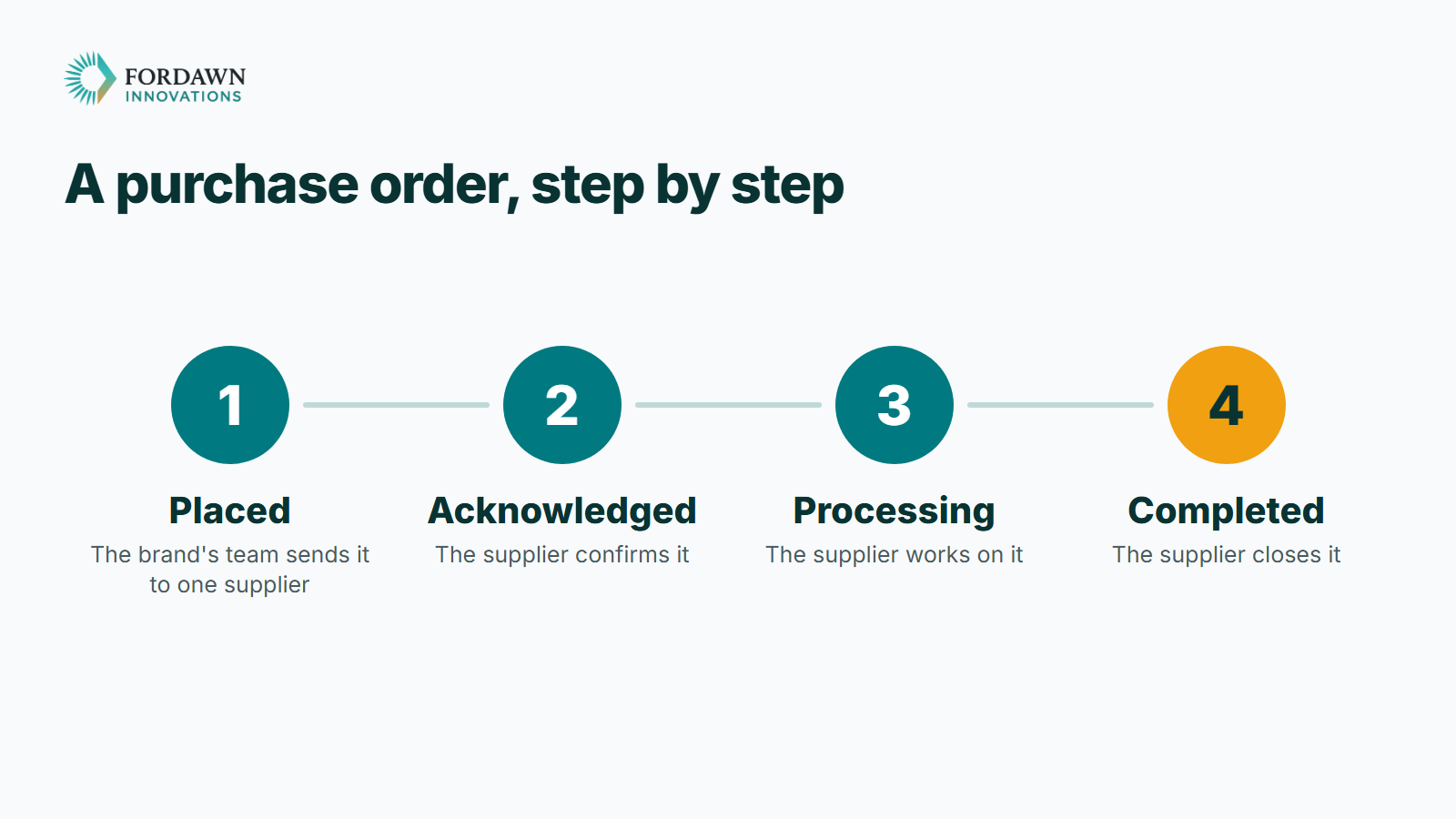
This gives each step one owner. The brand's team does not edit the supplier's progress, and the supplier does not edit the order the brand placed. A step cannot go back, so the record reads in one direction.
The limit is that the supplier has to act. If a supplier does not acknowledge an order, the order stays at its stage, and staff can see that stage.
How does cost approval work?
A supplier submits a cost for approval, and the brand's staff acknowledge it and then approve or reject it. A rejection must carry a written reason, and the supplier sees that reason.
The supplier can then resubmit revised numbers on the same submission, with a note about what changed. It goes back to pending on the same record, not on a new one.
The result is one thread per cost. A reviewer reads the original figure, the reason for the rejection, the change and the final figure in order.
What does the portal answer for a supplier?
The portal answers the questions a supplier asks most often, and it limits each answer to that supplier. The table sets out each question and its limit.
| A supplier asks | What the portal shows | Limit |
|---|---|---|
| Which purchase orders has the brand sent me? | The purchase orders sent to that supplier, with the stage of each | Only that supplier's, not another supplier's |
| Where is my cost? | Submitted costs with their approval status and history | A rejection must carry a written reason |
| Where do I send documents? | Attached to the purchase order they belong to | Seen by that supplier and the brand's team |
| Can I message the team? | A notes thread, and messages on each order | Messages go to staff, not to other suppliers |
| Can I read it in French? | A language switch with a translated set of words | Supplier screens only |
Why does the portal use two languages?
A supplier reads and writes best in their own language. The supplier screens carry a language switch for English and French, with a translated set of words behind it.
This suits a brand whose suppliers work in more than one language. The limit is that the switch changes the words on the screens. The portal does not claim more than that.
How do both sides know when something is new?
Both sides get a notice for anything new that is addressed to them. That covers a new purchase order, a new message, and a cost that was approved or rejected.
Every status change and every message keeps its own timestamped history. Each side can see who changed what and when, where it concerns them. That history turns a portal from a shared inbox into a record.
What do staff see on their side?
The brand's staff see a supplier list they can search and filter, and a way to invite a new supplier. They edit a supplier's profile and what that supplier may see, raise purchase orders and review costs.
A notice shows when a supplier message is waiting. A reorder screen lets staff set a minimum stock level or a recurring schedule for a supplier and a product.
Only the most senior staff permission level can open the staff side. Other staff roles see an access-denied message instead.
How do you check supplier portal software?
Check the portal by what it hides, not only by what it shows. A supplier portal earns trust when one supplier cannot see another.
- Ask which records each supplier sees, and which they do not see.
- Look for a way to change what one supplier may see without changing the others.
- Follow one cost from submission to approval, including a rejection and a resubmission.
- Check who owns each purchase order step.
- Open it with empty lists first, so no invented supplier makes it look finished.
This suits a brand that sources from several suppliers who each need a clear, private view. It does not suit a business that buys from one supplier by phone, where a portal adds more than it saves.
One last thing
List your suppliers and write what each should see and what they should not. Then tell Fordawn what a day looks like for your team, and the written scope starts there. The 5Senses work page shows the whole store.
Questions
What is supplier portal software?
It is a sign-in where a brand's suppliers receive its purchase orders, confirm them, send costs, attach documents and message the team, instead of using email and spreadsheets.
Who are the suppliers at 5Senses?
Product suppliers, for the raw spices and finished products, and packaging suppliers. The brand places purchase orders with them. They do not place orders in the store.
Does the portal show a supplier the store's customer orders?
No. A supplier sees only the purchase orders the brand sends them, with their own costs and messages. The store's customer orders are not part of it.
Is the supplier portal the same as wholesale?
No. Wholesale is the brand selling in bulk to approved trade buyers on the storefront. The supplier portal is where the brand's own suppliers receive its orders.
How does cost approval work?
A supplier submits a cost, staff acknowledge it, then approve or reject it with a written reason. The supplier can resubmit on the same record.
Who moves a purchase order forward?
The brand's team creates it. After that only the supplier moves it, one step at a time: acknowledged, processing, completed. A step cannot go back.
Which languages does the portal use?
English and French, with a language switch on the supplier screens and a translated set of words.
Has Fordawn built the 5Senses supplier portal?
Yes. Fordawn built it, in English and French, and it is ready to connect to suppliers.