Appointments, billing, prescriptions and your pharmacy. One OPD system.
MediFlow is OPD software for hospitals and clinics in India, running the whole outpatient department, built by Fordawn Innovations. Patients book and pay on your hospital’s own WhatsApp number, and walk-ins, phone calls and your own website land in the same list. Your staff run the day, the money and the pharmacy from one panel. There is no app for them to install.
Live in Tiruchirappalli, and building on-premise in Salem
 SIMS Chellum HospitalSalem · Multi-speciality
 Gift of Sight Eye HospitalTiruchirappalli · Eye care
The full story of the hospital that went live, including what the front desk did before, is written up as a case study.
The desk stops being the bottleneck.
Every OPD (outpatient department) booking that completes in WhatsApp is a call the front desk did not take, and a patient who did not wait on hold to make it.
| Area | Phone and register | MediFlow |
|---|---|---|
| Making the appointment | Phone and register
| MediFlow
|
| The morning of the visit | Phone and register
| MediFlow
|
| If the plan changes | Phone and register
| MediFlow
|
| Paying | Phone and register
| MediFlow
|
Six steps, and the patient never leaves the chat.
- 01Say Hi
- 02Choose language
- 03Choose doctor or service
- 04Pick date and slot
- 05Share details and pay
- 06Confirmed, then reminded
Book an appointment as your patients would.
Pick the option closest to your hospital. Scan its code with your phone camera, or tap the button if you are reading this on one. The demo opens in WhatsApp and runs the same booking flow a patient uses, on an invented hospital.
Past the demo, we set MediFlow up on your own hospital’s number for fourteen days before anything is agreed. Ask us and we will arrange it.
However the patient reached you, it lands in one list.
WhatsApp is one way in. It is not the only one you have. An OPD booking made at the front desk, taken over the phone, or made on your own website arrives in the same day list. It is counted in the same totals and paid for through the same receipt.
- One day list
- Walk-in · Phone · Website · WhatsApp
- Money counted as it comes in
- Cash · UPI · Card · Online
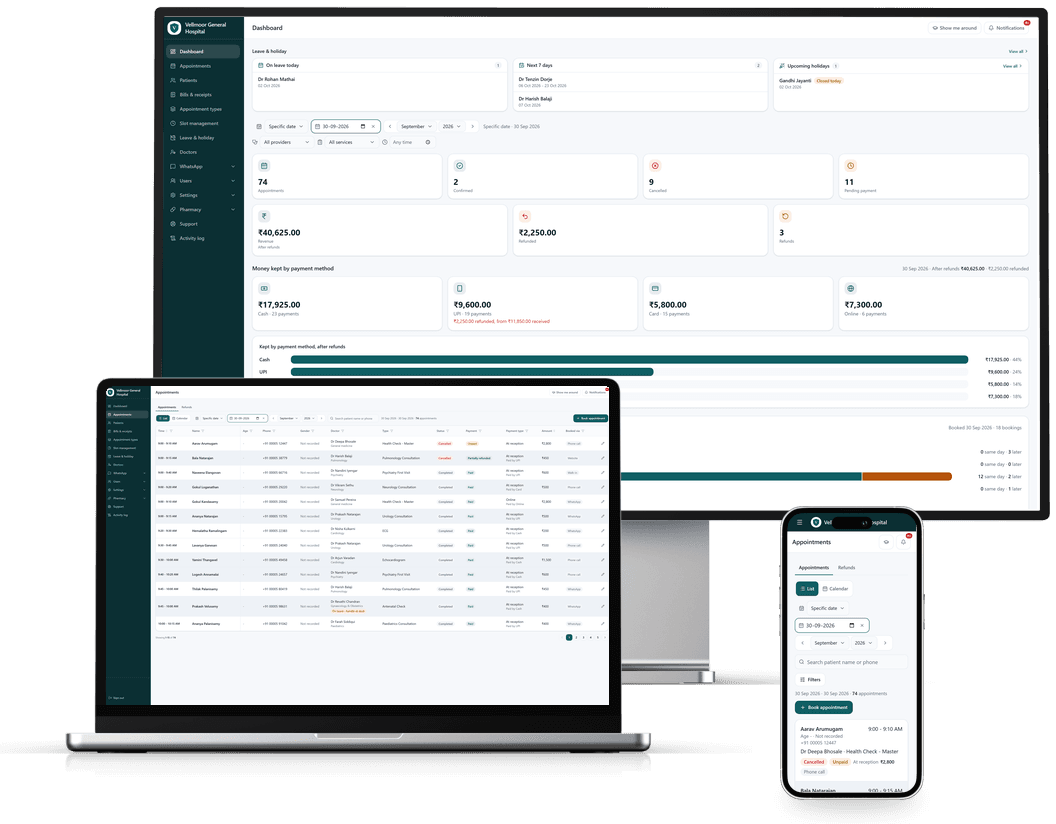
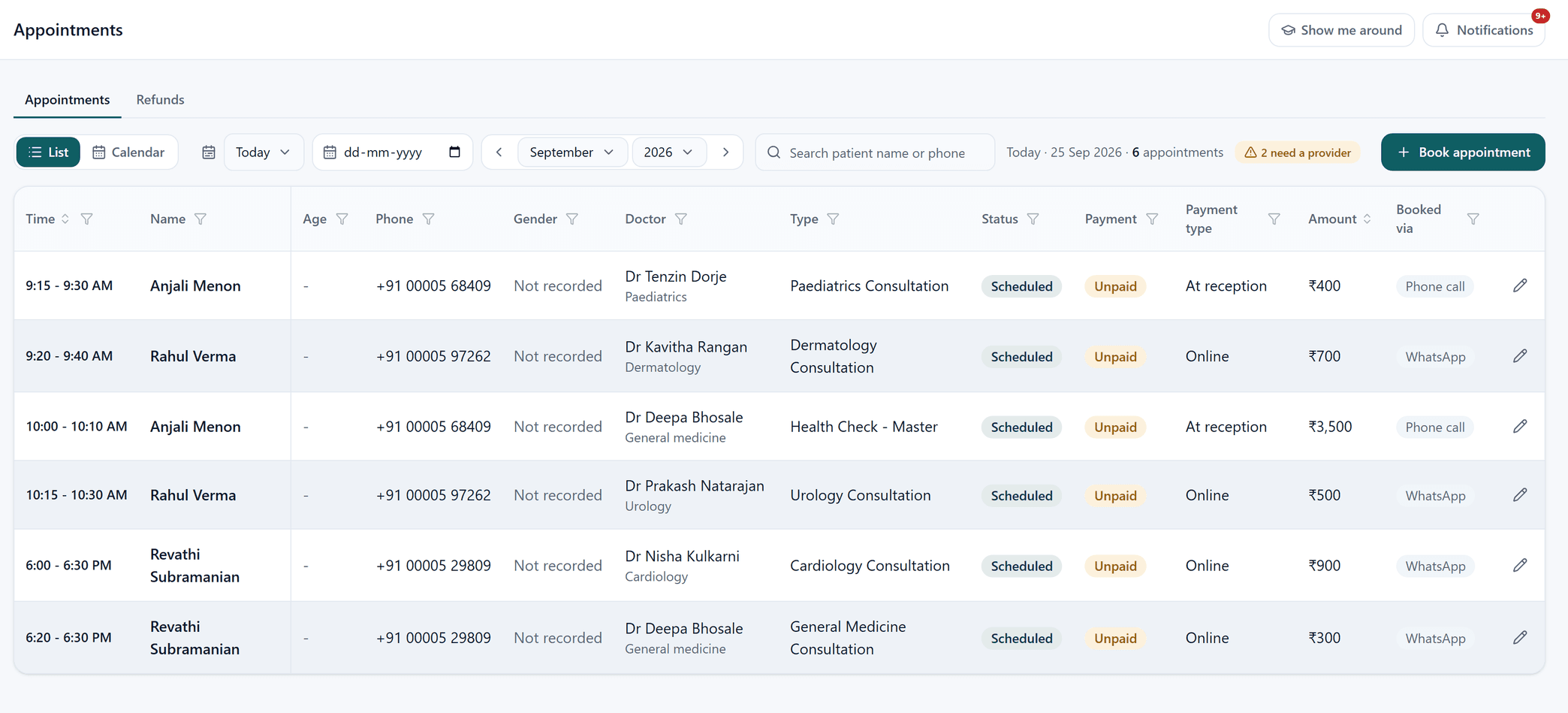
A multi-specialty day, in one screen
- The Booked via column is the point: WhatsApp and phone-call bookings sit in the same list, in time order, with nothing re-keyed between them.
- Paediatrics, dermatology, urology and cardiology in one day, each against the doctor actually seeing them.
- Payment type separates what was taken at reception from what was paid online, so the desk and the day takings can be compared.
- Filter the day by doctor, service, status, payment or how it was booked. Find one doctor's afternoon, or everything still unpaid, without exporting anything.
- Anything needing a decision is flagged rather than buried: here, two appointments still without an assigned provider.
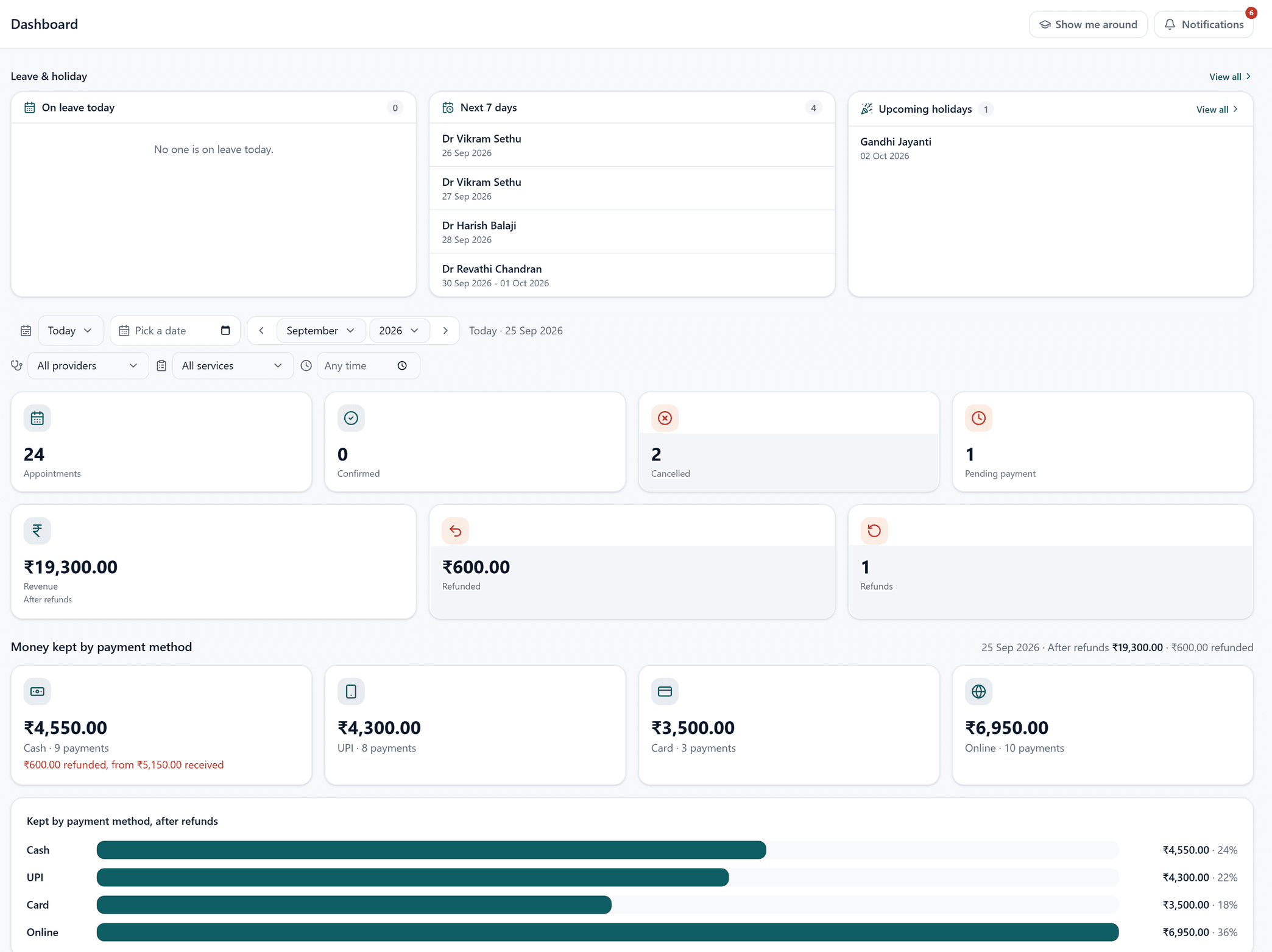
What the desk took today, split by how it was taken
- Cash, UPI, card and online are counted separately, so the drawer can be reconciled against the screen at the end of the day rather than at the end of the month.
- Revenue is shown AFTER refunds, with the refunded amount beside it, rather than a gross figure that has to be adjusted in somebody's head.
- Leave is on the same screen as the money: who is off today, who is off this week, and the next public holiday, because that is what decides tomorrow's slots.
- Filters by provider, by service and by time, so one consultant's day can be read without the whole hospital's around it.
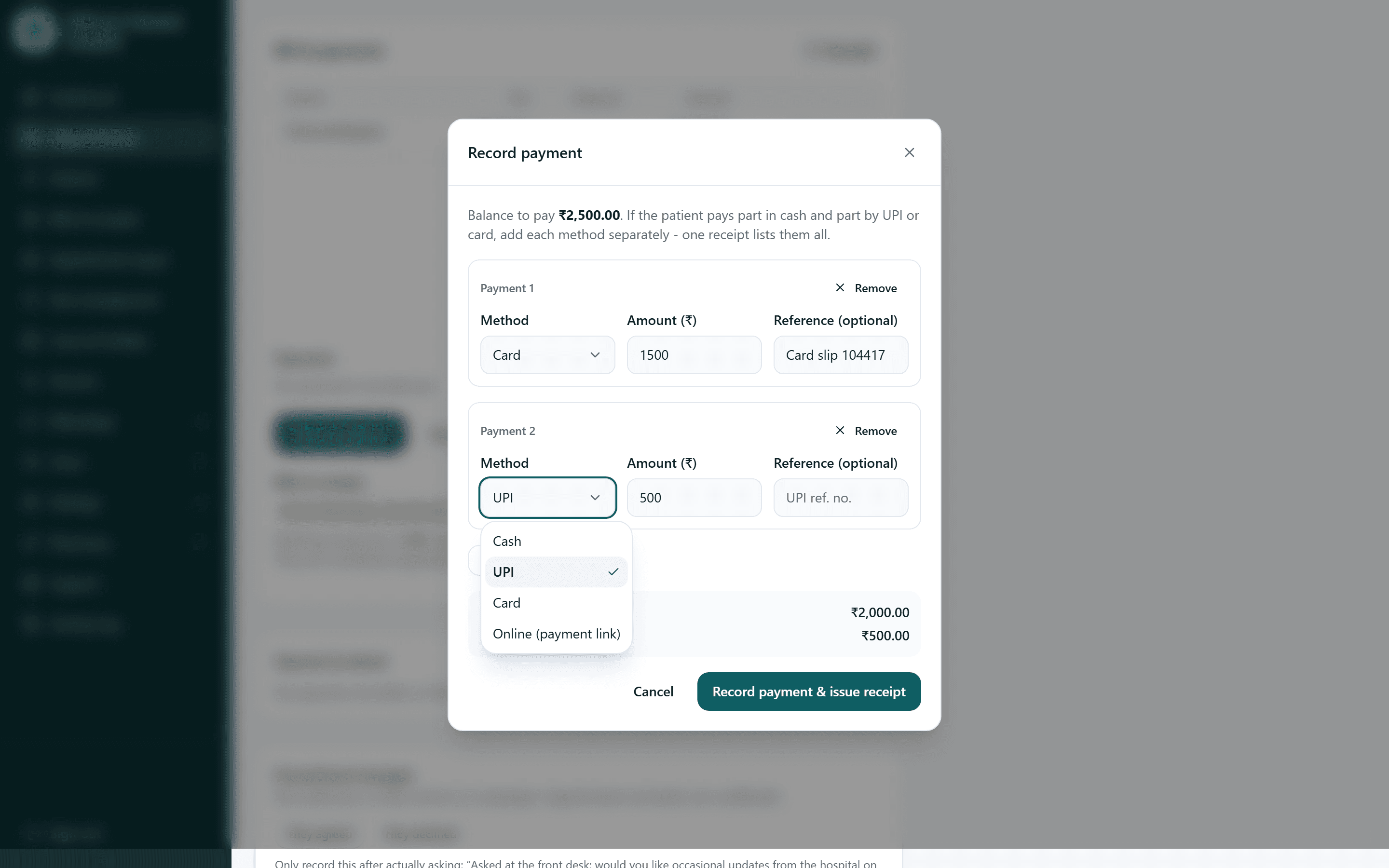
Part cash, part card, one receipt
- A real counter takes 1,500 on a card and 500 by UPI against one bill. Each method is entered separately with its own reference, and one receipt lists them all.
- The balance updates as the methods are added, so the person at the desk can see what is still owed without doing the arithmetic themselves.
- The card slip reference and the UPI reference are captured against the payment, which is what makes a dispute answerable three months later.
- This happens inside the appointment, not in a separate billing system, so the money and the visit are never two records to reconcile.
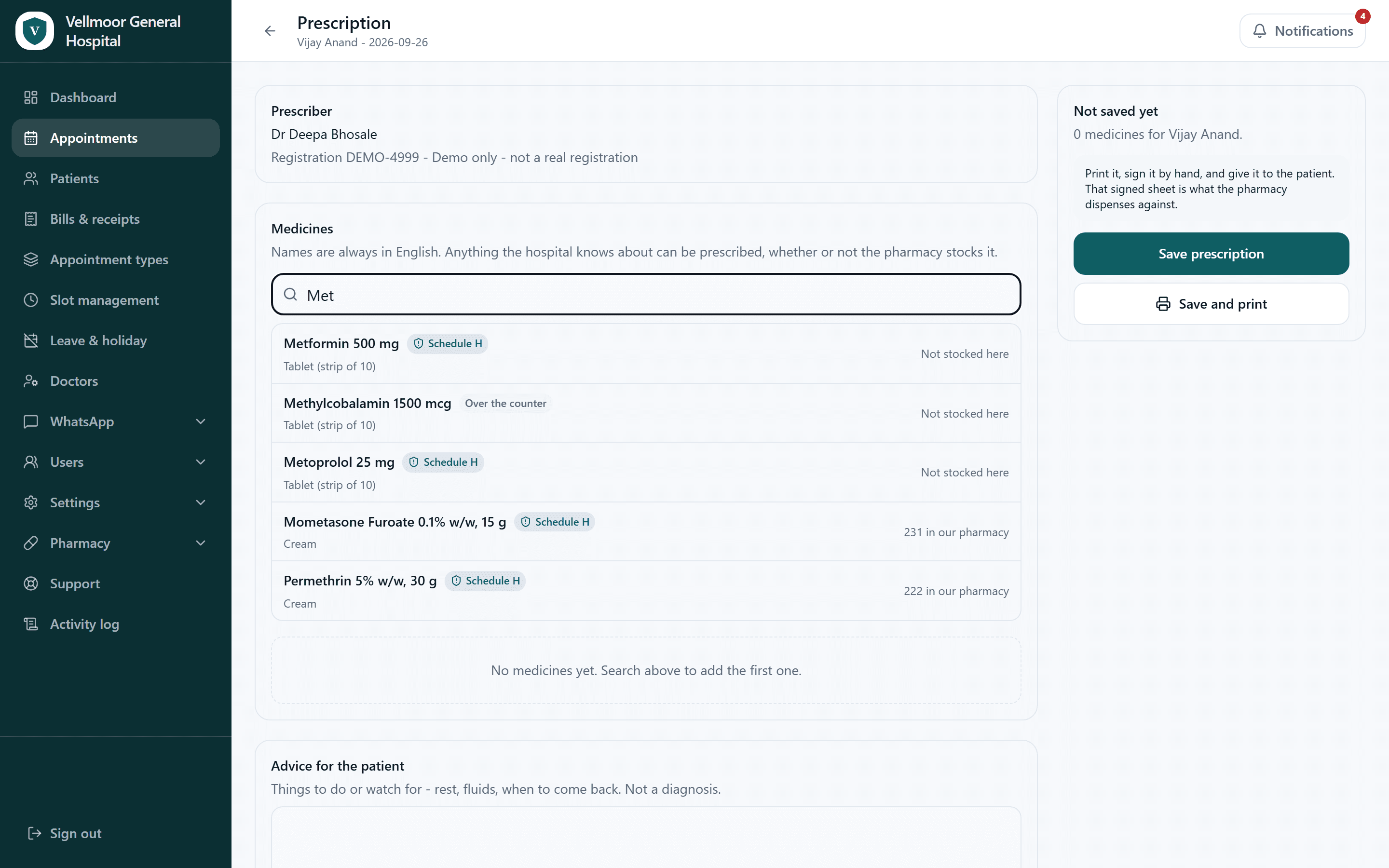
The prescription knows what the pharmacy has
- Typing three letters returns the matches, each marked Schedule H, Schedule H1 or over the counter, so the classification is on screen at the moment of choosing rather than looked up afterwards.
- Each medicine shows whether this hospital's pharmacy stocks it and how many units are on the shelf. The doctor finds out now, not when the patient reaches the counter.
- Anything the hospital knows about can be prescribed whether or not the pharmacy holds it. Stock is information, not a restriction on clinical judgement.
- The prescriber's registration number is printed on the prescription, because that is what makes it a document rather than a note.
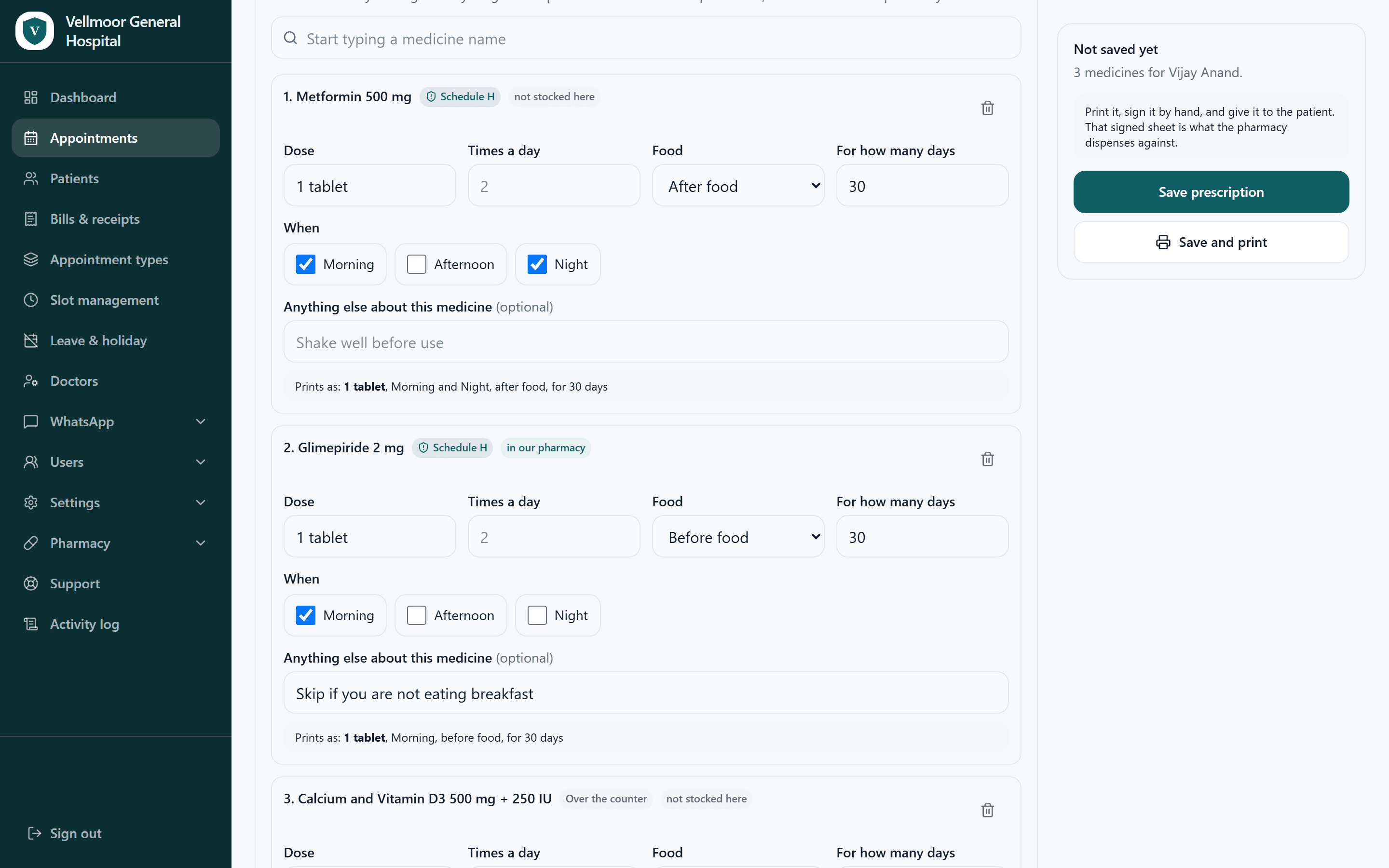
Written the way it will be read
- Dose, times a day, before or after food, and for how many days are separate fields, so the instruction that prints is unambiguous rather than a doctor's shorthand.
- Morning, afternoon and night are ticked rather than typed, so the timing prints as words on the sheet rather than as a doctor's shorthand.
- Each medicine shows exactly how it will print, underneath the fields, before anything is saved.
- Save and print gives the paper copy the patient expects, signed by hand. A patient who asks for it can have a copy on WhatsApp as well.
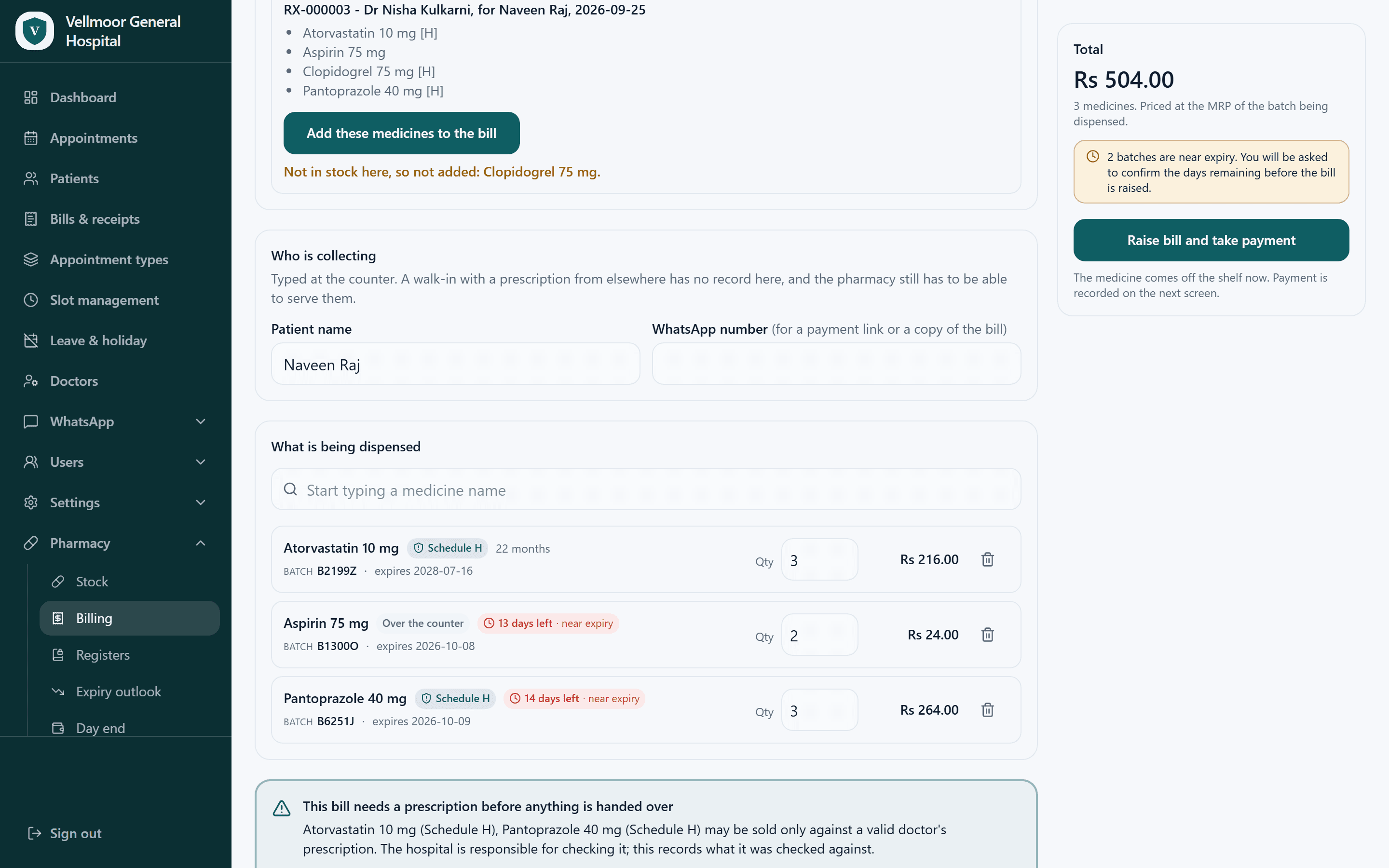
The counter works from the prescription itself
- Once the patient has agreed, the prescription arrives at the counter as a record rather than as paper they carry across the building. Nothing is re-typed, so nothing is mistyped.
- Every line is dispensed against a specific batch with its expiry. The pharmacy prints its prescription registers with every particular Rule 65(3) lists, and Schedule H1 keeps a separate register of its own.
- Two batches are flagged near expiry at the moment of dispensing, and the counter is asked to confirm the days remaining before the bill is raised.
- A medicine the pharmacy does not hold is shown and left off the bill rather than quietly substituted. The patient is told at the counter, not at home.
- A walk-in with a prescription from elsewhere has no record here, and the pharmacy still has to be able to serve them, so the patient's name and number are captured on the bill instead.
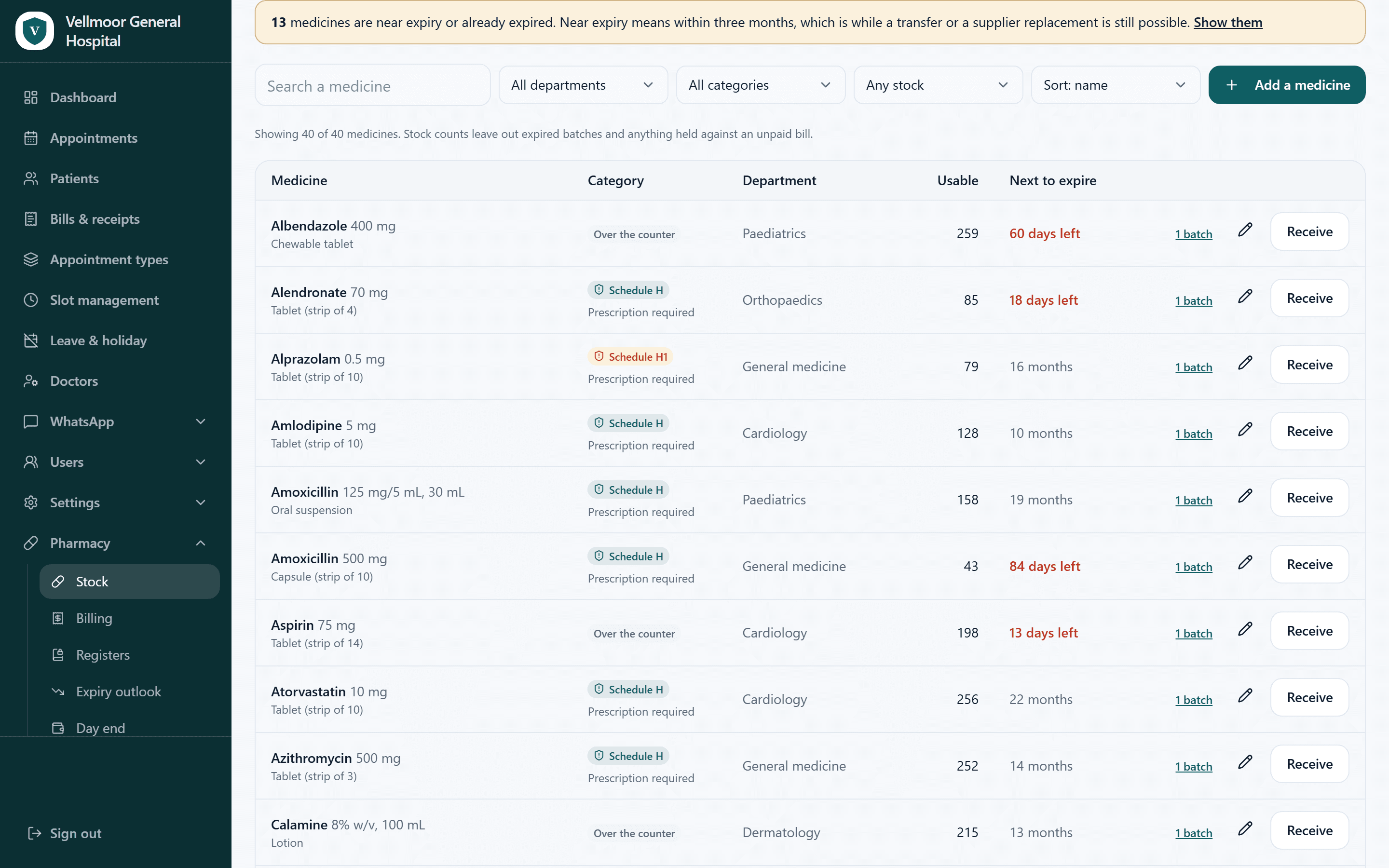
What is on the shelf, and what is about to stop being useful
- Thirteen medicines near expiry are called out at the top, with the note that near expiry means within three months, which is while a transfer or a supplier replacement is still possible.
- Expiry is counted in days remaining on the rows that matter, so sixty days and thirteen days do not look like the same problem.
- Schedule H and H1 are marked on the row as prescription required, so the person receiving stock sees the classification without checking a separate list.
- Stock counts leave out expired batches and anything held against an unpaid bill, so the usable number is genuinely the number that can be dispensed.
- Medicines can be labelled by department, so a paediatric line and a cardiology line are told apart on the shelf list.
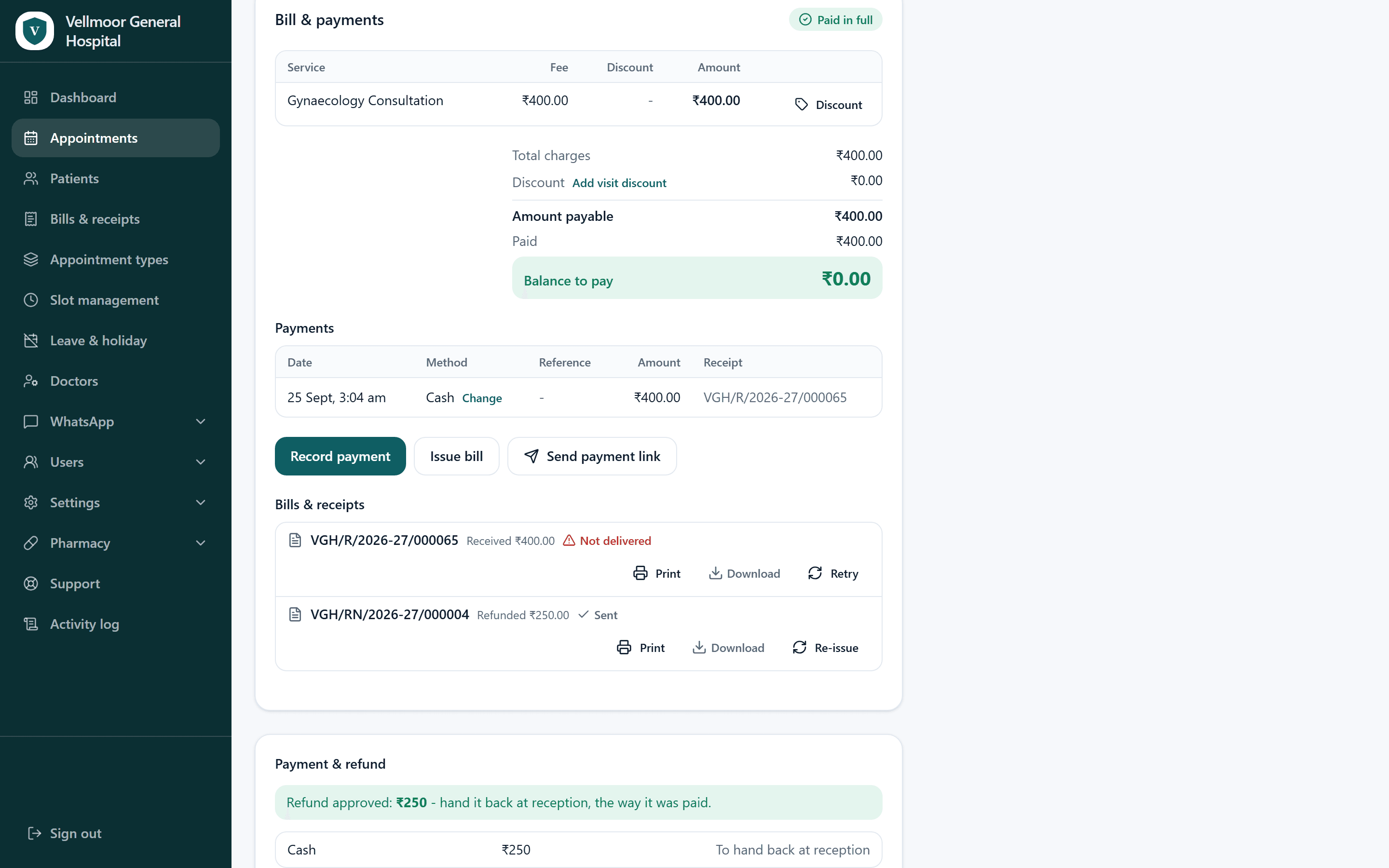
A cancelled visit, and the money that goes back
- The refund is a record against the visit, not a correction to the original bill. The receipt and the refund note both survive, which is what an audit needs.
- This one is partial: 250 rupees of 400 goes back and the rest is kept. The amount is entered by the person at the desk, so what was withheld is a decision somebody made and can explain.
- The refund note says how to return it, cash back at reception because cash was what came in, so the desk is not deciding that on the spot.
- Refunds already taken are subtracted from the day's revenue on the dashboard, so the takings figure never has to be adjusted by hand afterwards.
From our demo hospital. Every patient and doctor shown is invented.
Appointments, screen 1 of 8
One thread, from the first message to the pharmacy counter.
Booking on every channel
WhatsApp, the front desk, a phone call, or your own website. All of them write into the same calendar.
Customisable automated reminders
Sent at 8am on the morning of the visit by default, with a Get directions button that opens the hospital's map location. Tell us the time and the wording you want and we set it up. New wording is approved by WhatsApp first.
Reschedule and cancel
Handled in the thread, so a changed plan frees the slot instead of becoming a no-show.
UPI payments and invoices
Collected at booking or after the visit, with the invoice delivered back into the same chat.
Digital prescriptions
Printed on your letterhead and signed by hand, with the prescriber's registration number on it. A copy goes to the patient on WhatsApp when they ask for one.
Pharmacy integration
Once the patient agrees, the prescription reaches your pharmacy counter without anyone carrying paper across the building. A patient who prefers their own chemist keeps the signed prescription and can have a copy on WhatsApp with the prescriber's registration number.
HMS integration
Works alongside the HMS you already run. As part of an installation, Fordawn connects MediFlow to it with your HMS provider. The first connection is being built in Salem.
Health IDs on prescriptions and bills
Record a patient's Ayushman Bharat Health Account (ABHA) number, your Health Facility Registry (HFR) ID and each doctor's Healthcare Professionals Registry (HPR) ID. MediFlow prints them on prescriptions, bills and receipts, so the hospital's, the doctor's and the patient's national health IDs are on the paperwork.
Live admin panel
The front desk sees the day's appointments as they arrive, and can act on them in the same screen.
Your number, your patients, and your records kept apart.
MediFlow runs on the WhatsApp number your hospital already owns, so the relationship with your patients stays yours rather than being rented from a messaging platform.
A hospital gets a dedicated database project of its own. A small clinic can run on a shared one. Either way, each hospital’s and each clinic’s records are kept apart from everyone else’s, and Fordawn tests that separation by trying to break it before anyone goes live.
Your own WhatsApp number
Patients see your hospital's name and number in their chat list, on a number you own. The relationship is yours, and it does not move if you ever leave.
Dedicated or shared, and kept apart either way
A hospital gets a dedicated database project of its own. A small clinic can run on a shared one, where its records are kept apart from every other clinic's. Fordawn tells you which you are on before you sign.
Cloud as standard, on-premise as an installation
Cloud is the standard deployment. Running it on your own hardware inside the hospital is a quoted installation, and the first one is being built in Salem. The patient data belongs to the hospital in every case.
Tested by attacking it
Before a hospital goes live, Fordawn takes a real request, forges another hospital's identifier into it, replays it, and asserts the target is untouched. Separation you have not tried to break is an assumption rather than a property, so we attack it deliberately before anyone goes live.
Raised from inside MediFlow, answered against a written clock.
Your staff do not chase anyone. There is a Support tab inside the panel they already use: they describe the problem, attach screenshots, and it reaches us as a tracked ticket. These are Fordawn’s standard support targets. Each hospital’s agreement states the ones that apply to it.
Monday to Saturday, 9:30am to 6:30pm
Public holidays excepted. The clock only runs inside those hours, so a Saturday evening ticket is not quietly burning its response time overnight.
Site down is answered around the clock
A Priority 1 incident is accepted and responded to 24x7, including nights, Sundays and public holidays. That clock never stops.
99.5% availability, measured monthly
Excluding maintenance notified a day ahead, and outages at providers outside our control.
A missed target means a written explanation
Escalation and a root-cause report in writing, naming what happened and what changed because of it.
| Severity | We respond | We resolve |
|---|---|---|
| P1 CriticalNobody can reach it | 4 hours, around the clock | 24 hours, around the clock |
| P2 HighA major function is broken | 8 business hours | 2 business days |
| P3 MediumA defect on one page | 1 business day | 5 business days |
| P4 LowCosmetic and content edits | 2 business days | That month's maintenance cycle |
Responding means we have acknowledged the ticket and told you the severity we have assigned it. Resolving means a permanent fix, or a workaround that puts you back in service while the permanent fix is made.
What the doctors at the hospitals we work with say about us.

Working with the team was an absolute pleasure. They took the time to truly understand our requirements, remained responsive at every step, and delivered a final product tailored precisely to our needs. We are extremely pleased with their ongoing support and wouldn't hesitate to recommend their services.


I am thoroughly impressed with the service provided by the team. From day one, they were attentive, approachable, and completely aligned with our vision. It was a fantastic experience, and I look forward to collaborating with them again in the future.

The team made the entire process smooth and hassle-free. They were transparent in their communication, and genuinely committed to quality. I am truly impressed with their work and professionalism.

Fordawn MediFlow team did an exceptional job with not just the appointments and registration flow but also in interacting with the staff and training them for handling the app. Keep it up team.

The OPD day, from booking to the pharmacy counter, answered plainly.
Booking on WhatsApp
Can patients book an appointment on WhatsApp?
Yes. The patient messages your hospital's own WhatsApp number, chooses a department, a doctor and a time, and gets a confirmation in the same thread. There is nothing to download and no website form to fill in.
Do patients have to install an app?
No. The booking happens inside WhatsApp, which the patient already has open. There is no new account, no password and nothing for them to learn.
How does a WhatsApp appointment booking system reduce missed appointments?
A reminder goes out automatically at 8am on the morning of the visit, with a Get directions button so the patient arrives at the right gate. Tell us the time and the wording you want and we set it up. If the plan changes, the patient reschedules in the same thread, which frees the slot instead of leaving it empty.
Can a patient reschedule or cancel without calling the hospital?
Yes. Both are handled in the chat. A cancelled slot returns to the calendar, and a refund, where one is due, is recorded against the visit rather than as a correction to the original bill.
What happens to bookings taken at the front desk or over the phone?
They land in the same day list, in time order, with nothing re-keyed between them. A Booked via column shows how each one arrived. WhatsApp is one way in, not the only one you have.
Setting up at your hospital
Does the hospital need a new WhatsApp number?
No. MediFlow runs on the number your hospital already owns, so patients see your name in their chat list. The relationship stays yours and it does not move if you ever change supplier.
Does it work for an outpatient department with several doctors?
Yes. Paediatrics, dermatology, urology and cardiology can run on the same day, each appointment against the doctor actually seeing the patient. The day list filters by doctor, service, status, payment or how it was booked, so one consultant's day can be read on its own.
Can different roles see different things?
An administrator sets the roles, and a role decides what each person can see and do, so the pharmacy counter and the front desk get the screens their work needs. A doctor sees their own patients.
Is a WhatsApp booking system safe for patient records?
A hospital gets a dedicated database project of its own, and a small clinic can run on a shared one. Either way your records are kept apart from every other hospital's, and we test that separation by trying to break it before you go live.
Billing and payments
Can patients pay for an appointment inside WhatsApp?
Yes. Payment can be collected at booking or after the visit, and the invoice is delivered back into the same chat. Cash, UPI, card and online are counted separately, so the drawer reconciles against the screen at the end of the day.
Does MediFlow handle OPD billing, or only appointments?
Billing is part of it. A bill states what is owed and a receipt proves what was received, and they run on separate number series so a day's receipts can be totalled against the day's takings.
How are bills and receipts numbered?
Each number is allocated by a counter that cannot duplicate or skip, so six people issuing at once get six distinct numbers with no gaps. A document never changes after it is issued; a correction is a new document.
Can one bill be settled with more than one payment method?
Yes. Part on a card and the rest by UPI is entered as two payments against one bill, each with its own reference, and one receipt lists them all. The balance updates as they are added.
Prescriptions and pharmacy
Can the hospital's own pharmacy work from the same e-prescription?
Yes. When the patient agrees at the desk, their prescription appears on the pharmacy counter's list, and the counter dispenses against the prescription itself, every line on a specific batch with its expiry, so nothing is re-typed. None of that happens in the chat. A patient who prefers their own chemist keeps the signed prescription and takes it where they choose.
Does it track medicine stock and expiry?
Stock is counted by batch, so the usable number excludes expired batches, and medicines can be labelled by department. Medicines within three months of expiry are called out with the days remaining, while a transfer or a supplier replacement is still possible.
Price and trying it
How much does MediFlow cost?
Fordawn quotes per hospital rather than publishing a price, because what a single-specialty clinic needs and what a multi-specialty hospital needs are not the same deployment. Tell us how many consultants and departments run in your OPD and whether you want it on your own hardware, and you will get a written quote.
Can we try it before committing?
Yes. There is a live demo on WhatsApp that runs the same booking flow a patient uses, on an invented hospital. You can then run MediFlow for fourteen days on your own hospital's number. Ask us and we will set it up.
Try it the way your patients would.
The demo runs on WhatsApp and follows the same booking flow a patient uses. If you would rather talk it through first, that is usually the faster way in.
Or call +91 95666 96373.