On this page
A wholesale ecommerce platform is where a brand sells in bulk to approved trade buyers, such as bakers, chefs and restaurateurs. It should hold trade prices on the server. It should show them only to a buyer who has signed in and been approved, because hiding a price with a menu or a style leaves it in the page.
In short
- A wholesale ecommerce platform decides who may see trade prices on the server, before the page is sent to the browser.
- A price hidden by a menu or a style can still be read in what the browser receives, so it protects nothing.
- At 5Senses, retail shoppers and approved trade buyers use separate sign-ins, and staff approve each trade application.
- An approved buyer signs in, buys in bulk at trade pricing and orders through the same payment and order steps as a retail shopper.
Why this matters
A baker or a restaurant buys in bulk at a trade price that a retail shopper should never see. If the price leaks, the trade relationship suffers, and the store has two audiences reading one price list.
A b2b ecommerce platform also has to be easy for staff to run. A trade buyer who waits days for access goes back to the phone.
The limit is simple: the server gate protects a price, but it does not decide who deserves it. A person on staff still has to approve the buyer.
What is a trade-price gate?
A trade-price gate is the rule that shows trade prices only to a signed-in, approved buyer. The rule runs on the server, so a visitor who is not approved receives the retail page and nothing else.
The alternative is to send every visitor the same page and hide the trade price on screen. That looks safe in a browser, but the price still travels with the page. Anyone who looks at what the browser received can read it.
OWASP, the Open Worldwide Application Security Project, says access control is only effective in trusted server-side code. There, an attacker cannot change the check.
The same OWASP page advises denying access by default, except for public resources. A retail page is public. A trade price is not.
Which ways of showing trade prices fit which store?
The right way depends on how many trade buyers a store has and how often their prices change. The table sets out four common options and the limit of each.
| Option | Best for | Limit |
|---|---|---|
| Quote on request | A few trade buyers with prices set one by one | Slow, and every quote takes staff time |
| A separate wholesale site | A business with a very different catalogue for trade | Two sites to keep in step, two sets of content |
| One store, an approved login, prices decided on the server | Retail and trade sharing one catalogue and one checkout | Needs a staff approval step and clear roles |
| Trade price hidden on the page | No store that cares who sees its prices | The price still reaches the browser, so it is not hidden |
A store that sells to both shoppers and trade buyers from one catalogue usually fits the third row. A store with a few trade buyers and prices that change by phone call fits the first.
How does a trade buyer get access at 5Senses?
A trade buyer applies on a public form, staff review the application, and an approved buyer signs in separately. The store has one form for bakers and one for chefs and restaurateurs.
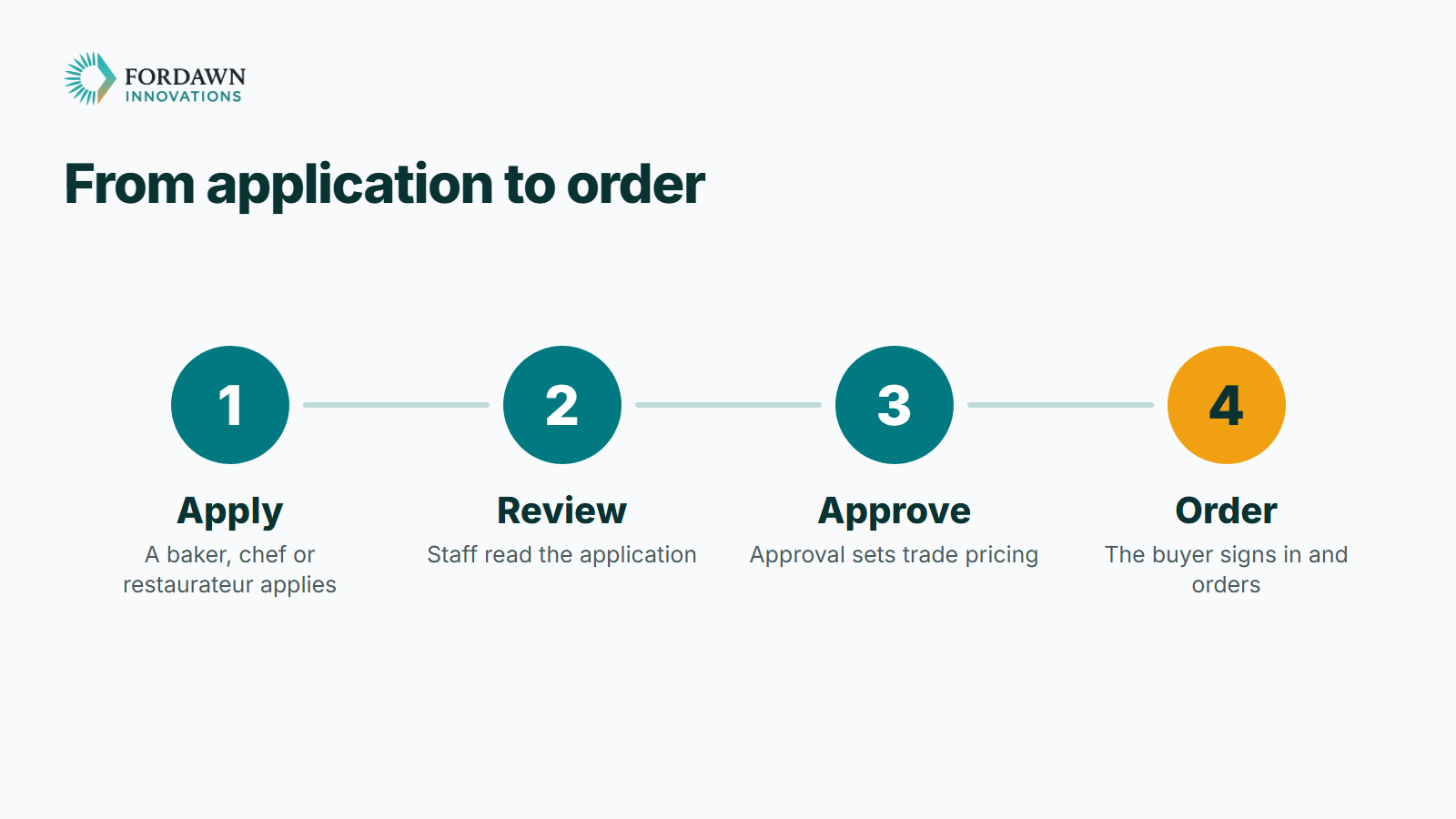
On the staff side, a new application waits in a pending list. A staff member opens it and moves it to approved or rejected. Approving sets the buyer up at wholesale pricing.
Retail and wholesale are separate sign-ins on separate protected areas of the store. A wholesale sign-in does not open a retail account, and a retail sign-in does not open the wholesale area.
What does an approved buyer see?
An approved buyer sees the store at trade pricing, with a bag, orders and an account of their own. The buyer reaches this only after staff approve the application.

The order itself goes through the same payment and order steps as a retail order. That keeps one checkout for the store, which is easier to run than two.
These trade buyers are the brand's customers. The brand's own suppliers are a different group. They supply the brand, and they use a separate supplier portal.
Access is checked on the server, not only hidden in the menu. That is the point of the gate: the rule sits where a visitor cannot change it.
What does a server gate not do?
A server gate controls who receives a price. It does not decide who deserves a trade account, and it does not stop an approved buyer from sharing a sign-in.
The first limit is a staff job. Someone has to read each application and decide. The store should make that decision quick to take and easy to find later.
The second limit is a habit. Give each trade buyer their own sign-in. The store then knows who ordered, and one sign-in can be dealt with on its own.
A gate is also only one layer. Staff roles decide who may approve a buyer, and each person should see only what their job needs.
OWASP's API security guidance names a second layer. It asks for an authorization check wherever a request names a record, so a user cannot reach a record by changing its identifier.
How do you check a wholesale platform before you choose it?
Check the gate first, then the people behind it. A platform can look finished and still send the trade price to every visitor.
- Ask where the trade price is decided, on the server or on the page.
- Open the store as a retail visitor and look for any sign of a trade price.
- Confirm that retail and wholesale are separate sign-ins.
- Walk through an application from the form to approval, as the buyer and as staff.
- Ask which staff role may approve a buyer, and what each role cannot do.
This suits a store that sells to shoppers and to trade buyers from one catalogue. It does not suit a business whose trade catalogue differs so much that a separate site is simpler.
One last thing
Write down who your trade buyers are and what each one should see. Then tell Fordawn what a day looks like for your team, and the written scope starts there. The 5Senses work page shows the whole store.
Questions
What is a trade-price gate?
It is the rule that shows trade prices only to a signed-in, approved buyer. The rule runs on the server, before the page is sent.
Why not just hide the price on the page?
A price hidden by a menu or a style still travels with the page. Anyone who reads what the browser received can see it.
How does a trade buyer get access at 5Senses?
A baker, chef or restaurateur applies on a public form. Staff review it and approve or reject it. An approved buyer signs in separately.
Does a wholesale sign-in open a retail account?
No. Retail and wholesale are separate sign-ins on separate protected areas, so one does not open the other.
Do trade buyers use a different checkout?
No. They order through the same payment and order steps as retail shoppers, after signing in and shopping at trade pricing.
Who approves a trade buyer?
Staff do. An application waits in a pending list until a staff member approves or rejects it, and approving sets trade pricing.
Can every staff member approve trade buyers?
Staff roles decide. Each person sees only what their job needs, so wholesale approval sits with the people responsible for it.
How does a store start with a trade area?
List your trade buyers and what each should see. Then tell Fordawn what a day looks like for your team, and the written scope starts there.
Sources
Keep reading
- OPD Management Software for Small Hospitals: The Morning Queue, the Register and the Receipt
OPD management software brings the token queue, the patient register and the bill-to-receipt step into one screen for a small hospital's front desk. Here is what to check before you choose one, and how a morning changes once you do.
- Custom Ecommerce Development: Ask Your Store a Plain Question About Orders and Stock
A store owner who can ask his own store a question in plain words saves a trip through reports. Here is what the 5Senses client can ask about orders, sales and stock, and how the connection stays read-only.
- Node.js Security Vulnerability: How to Protect Your Website
Node.js fixed ten security vulnerabilities on 21 October 2026. Here is what the Node.js security vulnerability means for your website or app, and three questions to ask your developer to stay protected.