On this page
- In short
- Why this matters
- How do you create a Freshdesk ticket from Teams?
- Where can the bot be added?
- Why should a helpdesk bot listen only when mentioned?
- What does the ticket contain?
- What happens when something fails?
- How does the chat thread travel with the ticket?
- Which approach suits which team?
- How to start
- One last thing
A Freshdesk Microsoft Teams ticket bot lets a person raise a ticket by mentioning the bot in a chat message. The message becomes a Freshdesk ticket, and the bot replies in the same conversation with the ticket number and a link. We built this for a team that works in Microsoft Teams and runs its support desk on Freshdesk.
In short
- In a channel, the bot acts only when someone mentions it, so ordinary conversation does not become tickets.
- The ticket is filed under the person who wrote the message, with the source team, channel and message recorded.
- Creating the ticket and confirming it in chat are handled as two separate steps, so one failure does not hide the other.
- This covers raising and tracking the ticket. It is not a Freshworks implementation service.
Why this matters
Microsoft Teams support requests often start as a chat message. Someone writes that a laptop will not connect, and a colleague says they will look. Unless a person copies that message into the helpdesk by hand, the request is easy to lose.
Staff should not have to leave Teams to get a tracked ticket. Agents, in turn, need the real requester and the conversation the request came from. Without those two facts, an agent has to go back and ask questions that were already answered in chat.
Fordawn is a software company in Salem, Tamil Nadu. We built this bot as a custom helpdesk bot for one team. Microsoft and Freshworks did not build it and do not endorse it.
How do you create a Freshdesk ticket from Teams?
A person mentions the bot in a message, and the bot creates a ticket from that message. The first line of the message becomes the ticket subject. The body keeps the full text, plus the team, channel and message it came from.
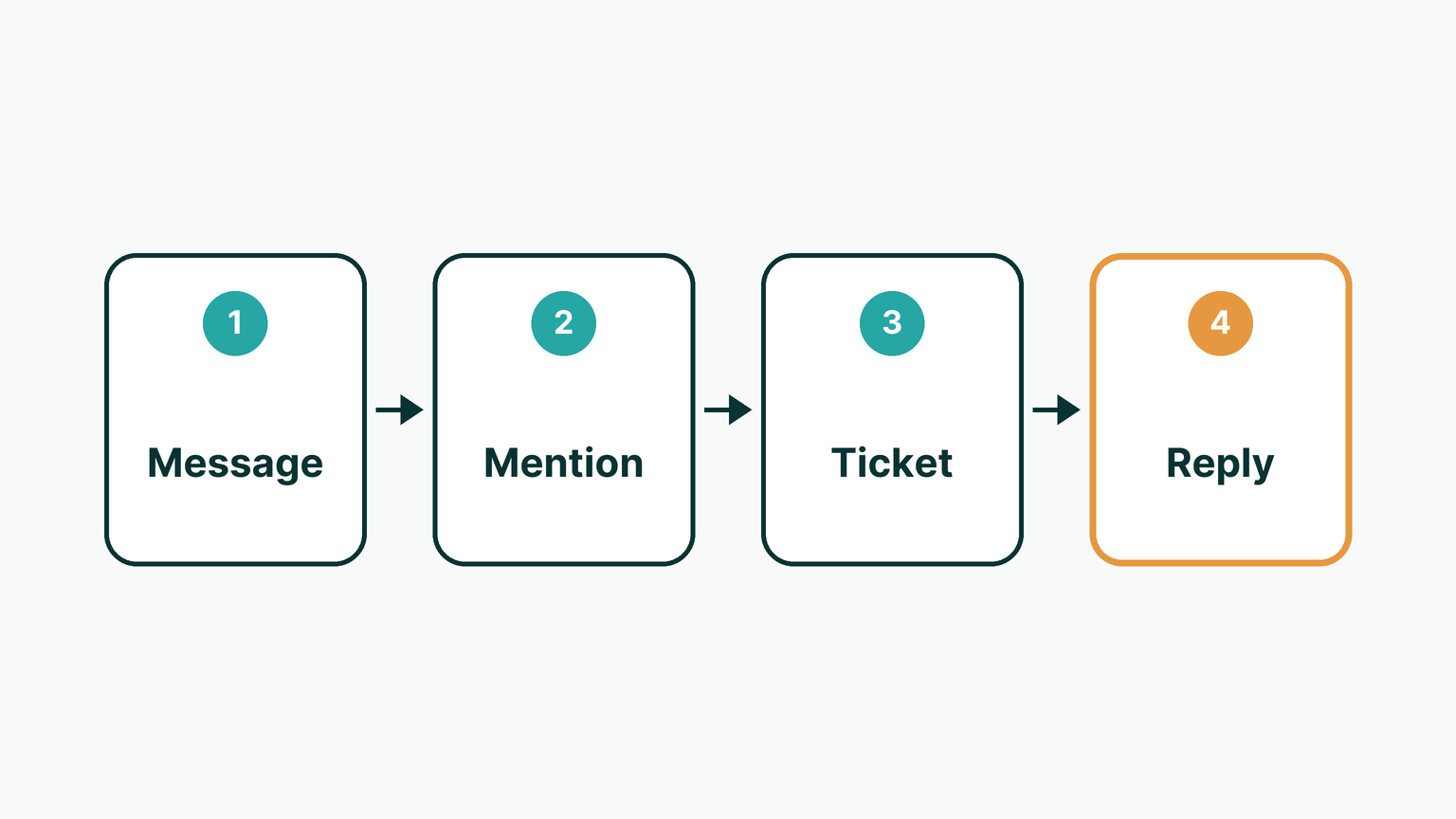
The bot then replies in the same conversation with the new ticket number and a direct link. The person can open the ticket without searching for it. This suits teams that already ask for help in chat and want a tracked record.
The limit is that the request needs to be written in a message. A request made in a phone call or in person still has to be typed in by someone.
Where can the bot be added?
The bot can be added to a one-to-one chat, a team channel or a group chat. In a one-to-one chat, a person can send a request privately. In a channel or a group chat, a whole team can use the same bot.

Choose the place by who needs to see the request. A private one-to-one chat suits a sensitive matter, while a channel suits a request that colleagues may add to. Each place follows the same ticket steps.
Microsoft's own documentation describes how bots work in channel and group conversations. A team's administrator decides who can add a bot in the first place.
Why should a helpdesk bot listen only when mentioned?
A helpdesk bot should act only when mentioned, because most chat is not a support request. In a channel, our bot ignores messages that do not mention it. Jokes, questions to a colleague and thanks do not become tickets.
If a bot listened to all messages, the helpdesk would fill with noise. Agents would then spend time closing tickets that nobody meant to raise. A mention is a clear choice by a person, and it works as consent to file a ticket.
The cost is that someone has to remember to mention the bot. For a team that prefers to raise tickets deliberately, that is a fair trade.
What does the ticket contain?
The ticket holds the subject, the full message, the requester and the source. It is filed under the person who wrote the message. Their name and work email are looked up from Teams, so the agent sees a real person and not a shared bot account.
If that lookup fails, the bot uses a safe fallback, so the ticket is still created. New tickets arrive open, at low priority, and with a tag. The tag marks work raised from chat, so the team can filter and report on those tickets.
An agent can change the priority after reading the ticket. The low default is a starting point, not a judgement about urgency.
What happens when something fails?
We treat two failure points separately: creating the ticket, and confirming it in chat. If Freshdesk refuses the ticket, the person is told plainly that it was not created. They know to try again or raise it another way.

If only the Teams reply fails, the ticket is still kept. The request is not lost because a confirmation message did not arrive. Keeping these steps apart means a problem in one does not hide a success in the other.
A plain failure message is better than silence. Without it, a person might assume a ticket exists when it does not.
How does the chat thread travel with the ticket?
A companion Freshdesk app carries the link back to the conversation. It picks up ticket updates and public replies, and it ignores private notes. It records the Teams thread each one came from.
This matters to the agent, who can see where each update started. The private notes stay inside the helpdesk, as agents expect. This app records the source thread, and it does not say that agent replies appear back in Teams.
Which approach suits which team?
A mention-based bot suits a team that raises requests on purpose and wants low noise. Other approaches suit other habits. The table compares four options.
| Option | Best for | Limit |
|---|---|---|
| Copy messages by hand | Very few requests | Requests are lost when no one copies them |
| Forward an email to the helpdesk | Staff who work in email | The person leaves Teams, and the source chat is not kept |
| Bot that acts only when mentioned | Teams that raise requests deliberately | Someone must remember to mention the bot |
| Bot that reads all messages | Teams that want every message reviewed | Ordinary conversation becomes noise in the helpdesk |
We do not give usage figures here, because we have none to report. This setup does not suit a team that does not use Teams or Freshdesk.
How to start
- List the places where requests start in chat today.
- Decide which teams and channels should have the bot.
- Agree the default status, priority and tag for tickets raised from chat.
- Check that Teams can supply each person's name and work email.
- Write the plain message people see when a ticket is refused.
- Test a mention in a private chat before adding the bot to a channel.
One last thing
If your team asks for help in Microsoft Teams and tracks it in Freshdesk, we can talk through your case. The first call and scoping carry no charge. Reach us on the contact page, or see our services.
Questions
How do I create a Freshdesk ticket from Teams?
Mention the bot in a message. The bot turns the message into a Freshdesk ticket and replies in the same conversation with the ticket number and a direct link.
Where can the bot be used in Teams?
It can be added to a one-to-one chat, a team channel or a group chat. In a channel it acts only when someone mentions it.
Will every message in a channel become a ticket?
No. In a channel the bot acts only on a mention. Ordinary conversation is ignored, so the helpdesk does not fill with tickets nobody meant to raise.
Who is the ticket filed under?
The person who wrote the message. Their name and work email are looked up from Teams, with a safe fallback if that lookup fails, so the agent sees a real requester.
What are the default ticket settings?
New tickets arrive open, at low priority, and tagged so chat-raised work can be filtered and reported. An agent can change the priority after reading the ticket.
What if Freshdesk refuses the ticket?
The person is told plainly in the chat that the ticket was not created. If only the Teams reply fails, the ticket is still kept.
Is this a Freshworks implementation service?
No. It covers raising and tracking a ticket from Teams. Microsoft and Freshworks did not build it and do not endorse it.
Sources
Keep reading
- Hospital billing software India: split payments and refunds
What to check in hospital billing software in India: payments recorded inside the visit, split cash, card and UPI on one bill, payment links, numbered receipts, and a refund note that keeps the original receipt.
- Freshdesk Sidebar App: Orders, Refunds and Returns in One Panel
How a custom Freshdesk Omni sidebar app shows orders, refund status and returns beside the ticket, with roles, confirmation steps and a searchable log. Built for a large direct-to-consumer brand in India.
- Node.js Security Vulnerability: How to Protect Your Website
Node.js fixed ten security vulnerabilities on 21 October 2026. Here is what the Node.js security vulnerability means for your website or app, and three questions to ask your developer to stay protected.